EC2
- EC2 is not just virtual machines, it consists of VMs, EBS, EIP, ENI, etc.
- Use user-data to run a script at launch. This script is only run once at the instances first start and runs as root
- t2.micro is part of the free tier
EC2 Instance Types
- General Purpose (t)
- Compute Optimized (c)
- Memory Optimized (r)
- Storage Optimized (i,d,h1)
Security Groups
- Security Groups are like a firewall for EC2 instances
- Security groups only contain allow rules
- Security groups are stateful. Meaning if we have an inbound allow rule, we don’t need a corresponding outbound allow rule
- For the source of the traffic, Security Groups can reference an IP address, other security groups, and prefix lists
- Security Groups and VMs have a many-to-many relationship
Ports to know for the exam
- 21 = FTP
- 22 = SSH/sFTP
- 80 = HTTP
- 443 = HTTPS
- 3389 = RDP
- 5432 - Postgresql
- 3306 - MySQL
- Oracle RDS - 1521
- MSSQL - 1433
- MariaDB - 3306
Placement Groups
- Use Placement Groups when you want to control how your EC2 instances are scheduled on underlying infrastructure
- Placement Group strategies
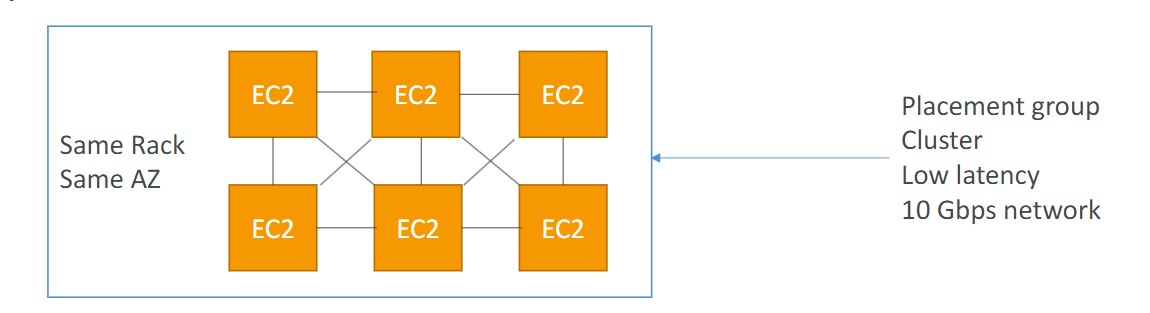
- Cluster
- Scheduled EC2 instances into a low-latency group in a single Availability Zone
- Use cases:
- Big Data job that needs to complete fast
- Application that needs extremely low latency and high network throughput
- Spread
- Pros:
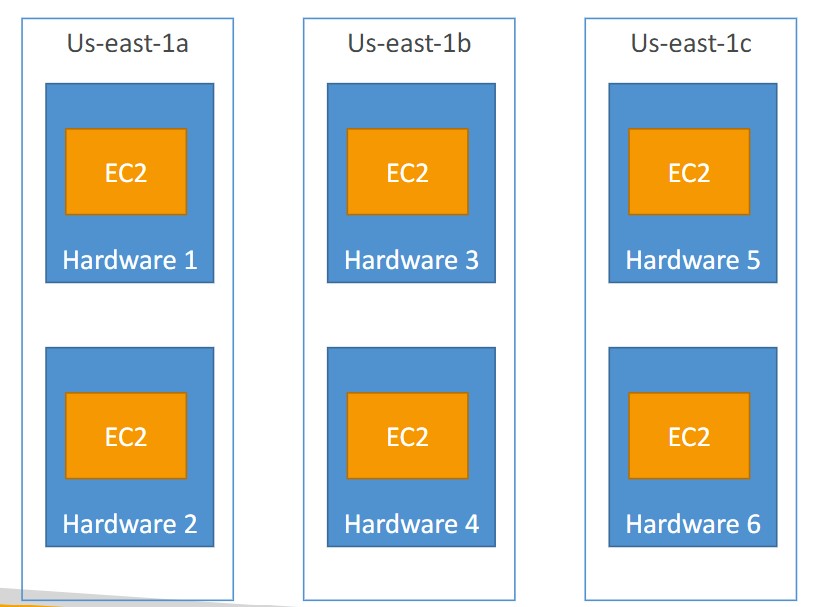
- Can span across Availability Zones (AZ)
- Reduced risk is simultaneous failure
- EC2 instances are on different physical hardware
- Cons:
- Limited to 7 instances per AZ per placement group
- Use cases:
- Application that needs to maximize high availability
- Critical Applications where each instance must be isolated from failure from each other
- Pros:
- Partition
- Spreads instances across many different partitions (which rely on sets of racks) within an AZ. Scales to 100s of EC2 instances per group
- Cluster
Elastic Network Interfaces
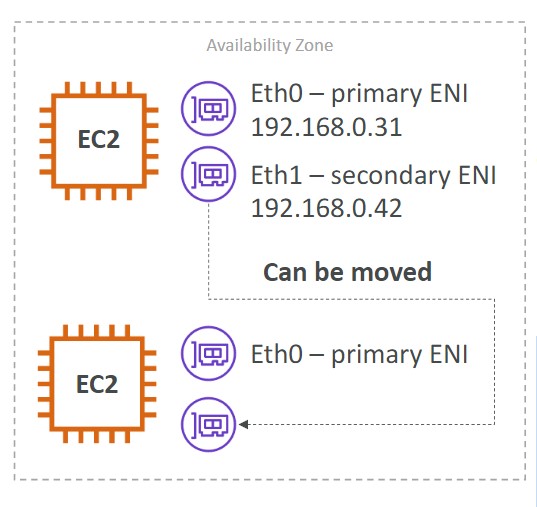
- The ENI can have the following attributes:
- Primary private IPV4, one or more secondary IPv4
- One ELastic IP (IPv4) per private IPv4
- One or more Security Groups
- A MAC address
- You can create ENI independently and attach them on fly (move them) on EC2 instances for failover
- Bound to a specific availability zone (AZ)
- You can change the Termination Behavior so that if a VM is deleted the attached ENI is/isn’t deleted with it
Spot Instances
- Up to 90% discount
- Specify a max price you are willing to pay for your instances. If you go over the price, you have two options:
- Two minute grace period
- Stop the instance or terminate the instance
- If you don’t want AWS to reclaim the capacity, you can use a Spot Block to block AWS from reclaiming the instance for a specified time-frame (1-6 hours)
- The MOST cost-efficient instance pricing
- Useful for workloads that are resilient to failure (batch jobs, etc.)
- Persistent vs. One-Time Spot Requests. With a persistent spot request, if an instance is terminated, it will be restarted. With a one-time spot request, if an instance is terminated, it will NOT be restarted.
Spot Fleets
- Get a set of spot instances + On-Demand instances
- Strategies
- Lowest Price: Spot Fleet will launch instances from the pool with the lowest price
- Diversified: distributed across all pools
- capacityOptimized: pool with optimal capacity for the number of instances
- priceCapacityOptimized: Pools with highest capacity available, then select the pool with the lowest price
Elastic IPs
- When you start and stop an EC2 instance, the public IP won’t change
- You can only have 5 Elastic IP addresses in your AWS account by default. You can ask AWS to increase this limit.
- Try to avoid using EIP
EC2 Hibernate
- Store the RAM on disk when the OS is stopped.
- Faster startup
- The root EBS volume must be encrypted and it must have enough space to store the contents of RAM
- Instance RAM size must be less than 150GB
- Does not work for bare metal instances
EBS
- Bound to an AZ
- Can be attached/detached from instances on the fly
- EBS volumes can be mounted to multiple instances using ‘multi-attach’
- Up to 16 instances at a time can be attached to a volume
- You can move an EBS volume across AZ by creating a snapshot and copying it to another region
- Snapshots
- You can move a snapshot to an ‘archive tier’ that is 75% cheaper
- Takes 24 to 72 hours to restore the snapshot from the archive
- Recycle Bin
- You can setup rules to retain deleted snapshots so you can easily recover them
- Specify a retention for the recycle bin (from 1 day to 1 year)
- Fast Snapshot Restore (FSR)
- Force full initialization of your snapshot to have no latency on first use.
- Expensive to use
- Encryption
- data at rest and data in motion are both encrypted
- all snapshots are encrypted
- Copying an unencrytped snapshot enables encryption
- How to encrypt an unencrypted volume
- Create a snapshot of the volume
- Encrypt the snapshot using the copy function
- Create new EBS volume from the snapshot (the volume will be encrypted)
- Attach the encrypted volume to the original instance
- Root volumes are automatically deleted (Termination Policy) when a EC2 instance is terminated. Other EBS volumes attached to the instance are not deleted unless their termination policy says to delete them on termination of the EC2 instance.
EC2 Instance Store
- Ephemeral storage
- High performance
- Use cases:
- buffer
- cache
- Data loss when the EC2 instance reboots
AMI
- VM Image
- Locked to a region, but can be copied across regions
- Types of AMIs:
- Public (AWS Provided)
- Private (created by you)
- MarketPlace (3rd party vendor)
EBS Volume Types
-
Types:
- gp2/gp3 (SSD): General purpose SSD volume. Balance price and performance
- io1/io2 Block Express (SSD): Highest performance SSD volume for mission-critical low-latency or high-throughput workloads
- st1 (HDD): Low cost HDD volume designed for frequently accessed, throughput-intensive workloads
- Cannot be a boot volume
- 125GB to 16 TB
- sc1 (HDD): Lowest cost HDD volume designed for less frequently accessed workloads
-
Only GP2/GP3 and IO1/IO2 can be used as a boot volumes
-
With GP3, you can independently set IOPS and throughput. With GP2, they are linked together
Provisioned IOPS
- Provisioned IOPS volumes are used for critical business applications with sustained IOPS performance
- Great for database workloads
- io1 Provisioned IOPS:
- If you want to get over 32000 IOPS, you need Nitro 1 or Nitro 2
Auto Scaling Group (ASG)
- Automatically scale out EC2 instances to meet traffic demand. You can scale based on a CloudWatch Alarm (metric), schedule,
- Set a minimum capacity, desired capacity, and max capacity
- The ASG itself is free
- Create a launch template, which specifies how to launch instances within the ASG
- Scaling Policies
- Dynamic Scaling
- Target Tracking Scaling
- Simple, example: keep CPU usage around 50%
- Target Tracking will create CloudWatch Alarms for you
- Simple / Step Scaling
- When a CloudWatch Alarm is triggered, add 2 instances
- Target Tracking Scaling
- Scheduled Scaling
- Scale based on a schedule
- Predictive Scaling
- Forecast load and scale ahead of time
- Dynamic Scaling
- Scaling cooldown (default 300 seconds). The ASG will not launch or terminate instances