- RDS
- RDS Proxy
- Aurora
- Introduction to Aurora
- Aurora Availability
- Fault Tolerance and Durability
- Aurora Replicas
- Aurora Serverless
RDS
- Relational Database Service
- Database service for database engines that use SQL as a query language
- Engines:
- Postgresql
- Mysql / Mariadb
- Oracle
- MSSQL
- IBM DB2
- Aurora (Proprietary AWS Relational Database)
- You cannot access the underlying compute instances for RDS unless you are using RDS Custom
- RDS Custom supports Oracle and Microsoft SQL Server
- RDS scales storage automatically
- You have to set the Maximum Storage Threshold (max amount of storage to use)
- Supports all RDS engines
Read Replicas
- Scale out read operations
- Create up to 15 read replicas within the same AZ or across AZ’s or across regions
- Replication is asynchronous
- You can promote a read-replica to it’s own database capable of full writes
- Network Costs
- If the read replicas is in the same region, there is no cost for replication traffic
- For cross-region replication traffic, there is a cost
- You can setup read-replicas as Multi-AZ for fault tolerance
RDS Multi-AZ
- Mainly used for disaster recovery
- synchronous replication to a standby database
- One DNS name for both databases with automatic failover
- Multi-AZ replicas cannot be read or written to until they are promoted to the primary instance
- Converting from single-AZ to multi-AZ requires no downtime. This can be done in the “modify” section of the RDS database
- A snapshot is taken and restored into a new standby database. Then a full sync of the database is initiated.
RDS Proxy
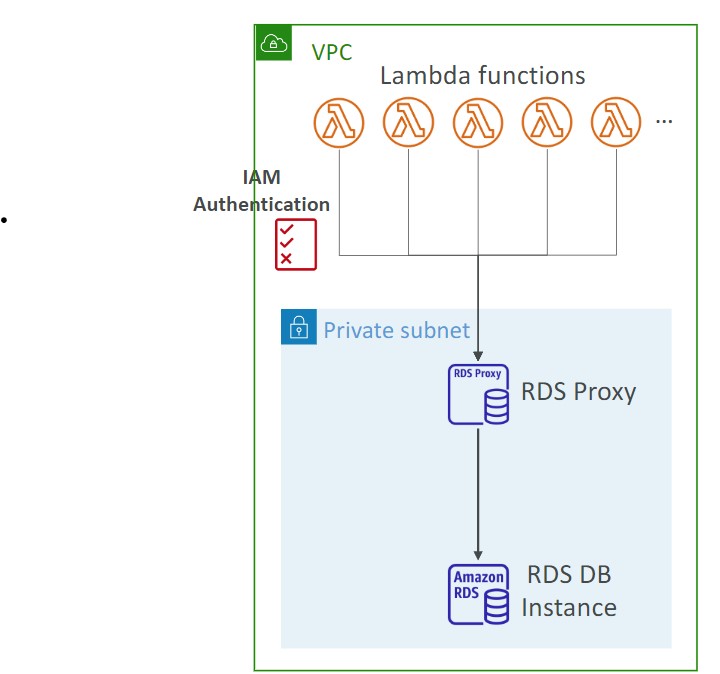
- Fully managed database proxy for RDS
- Allows apps to pool and share DB connections established with the database
- Improving database efficiency by reducing the stress on database resources (e.g CPU, RAM)and minimize open connections (and timeouts)
- Serverless, autoscaling, highly available (multi-AZ)
- Reduced RDS and Aurora failover time by up 66%
- Supports RDS (MySQL,PostgreSQL, MariaDB, MS SQL Server) and Aurora (MySQL, PostgreSQL)
- No code changes required for most apps
- Enforce IAM authentication for DB, and securely store credentials in AWS Secrets Manager
- RDS proxy is never publicly accessible
- RDS Proxy is useful for highly scaling lambda functions that open database connections
RDS Backups
- Daily full backup of the database
- Transaction logs are backed up every 5 minutes
- 1 to 35 days of backup retention, set to 0 to disable
Aurora
- Fully managed Postgres or MySQL compatible database designed by default to scale and fine-tuned to be really fast
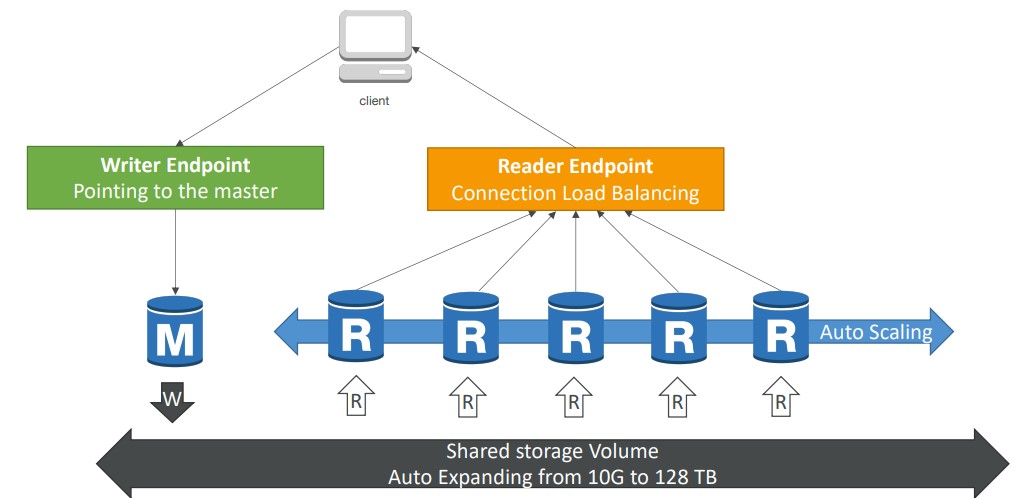
- Aurora automatically grows in increments of 10GB, up to 128 TB
- 5x performance over MySQL, 3x performance over Postgres
Introduction to Aurora
- Combines the speed and availability of high-end databases with the simplicity and cost-effectiveness of open source databases
- Aurora can run either MySQL or Postgres compatible engines
- Aurora MYSQL is 5x better performance than traditional MySQL
- Aurora Postgres is 3x better performance than traditional Postgres
- Aurora Costs more than RDS (20% more) but is more efficient
Aurora Availability
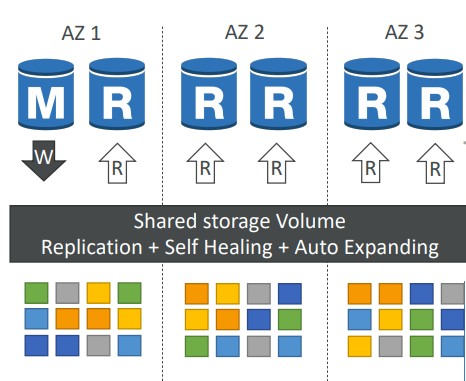
- 6 copies of your data in 3 AZ:
- Needs only 4 out of 6 copies for writes (so if one AZ is down then it is fine)
- Need only 3 out of 6 for reads
- self healing with peer-to-peer replication
- Storage is striped across 100s of volumes
- Automated failover for master happens in less than 30 seconds
- Master + up to 15 Aurora Read Replicas serve reads. You can autoscale the read replicas. Clients connect to the “Reader Endpoint”, which will point to any of the read instances
Fault Tolerance and Durability
-
Aurora Backup and Failover is handled automatically
-
Aurora has a feature called Backtrack that allows you to restore to any point in time without restoring from backups
-
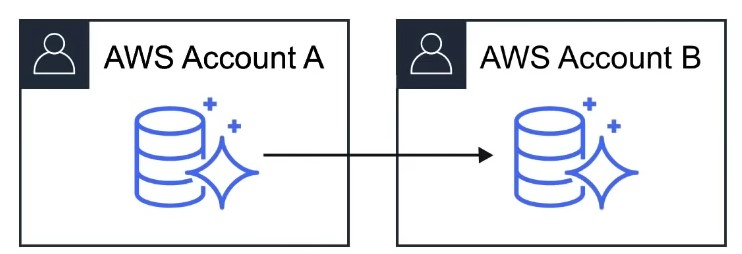
Snapshots of data can be shared with other AWS accounts
-
Storage is self-healing , in that data blocks and disks are continuously scanned for errors and repaired automatically
Aurora Replicas
| Amazon Aurora Replicas | Mysql Read Replicas | |
|---|---|---|
| Number of Replicas | Up to 15 | Up to 5 |
| Replication Type | Asynchronous(ms) | Asynchronous (s) |
| Performance impact on primary | Low | High |
| Act as failover target | Yes (no data loss) | Yes (potentially minutes of data loss) |
| Automated failover | Yes | No |
| Support for user-defined replication delay | No | Yes |
| Support for different data or schema vs primary | No | Yes |
Aurora Serverless
- Aurora except the database will automatically start up, shut down, and scale capacity up or down based on your application’s needs
- Apps used a few minutes several times per day or week, eg. low-volume blog site
- pay for database storage and the database capacity and I/O your database consumes while it is active
Aurora Backups
- 1 to 35 days rention
- Cannot be disabled
- Point in time recovery
- Manual snaphots
- Retain manually created snapshots for any amount of time
Aurora Database Cloning
- Clone an existing Aurora database into a new database
- Uses copy-on-write, so it’s very fast