- Introduction to S3
- S3 Storage Classes
- Storage class comparison
- S3 Security
- S3 Encryption
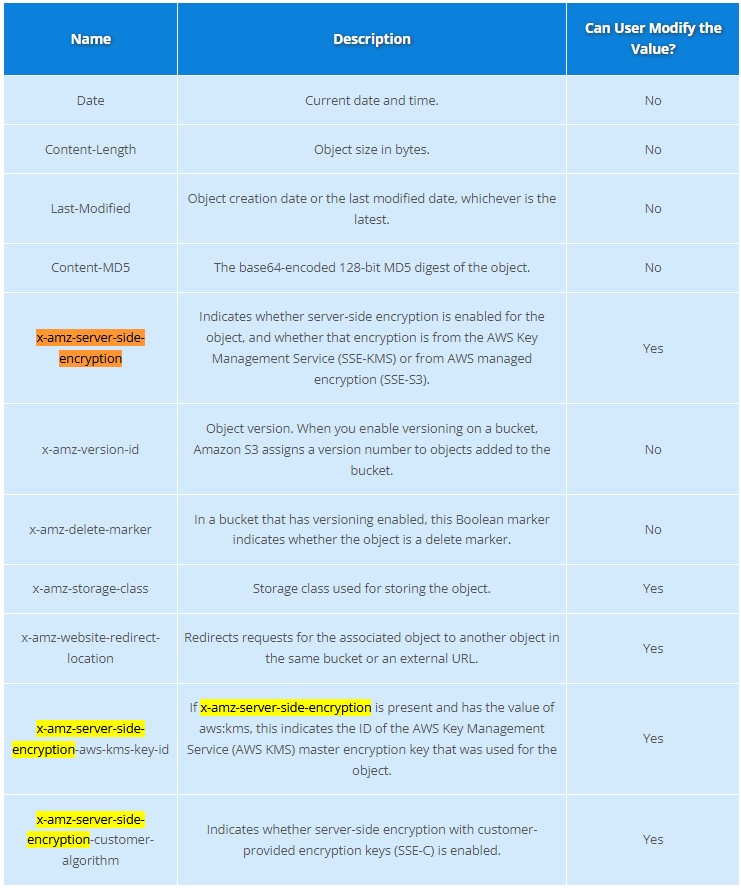
- S3 Objects
- S3 Data Consistency
- S3 Cross-Region Replication
- S3 Versioning
- Lifecycle Management
- S3 Transfer Acceleration
- Presigned URLs
- MFA Delete
- AWS Snow Family
- Storage Services
- Storage Gateway
- Amazon FSx vs EFS
- S3 Object Lock
Introduction to S3
- What is Object Storage (Object-based storage)?
- data storage architecture that manages data as objects, as opposed to other storage architectures:
- file systems: which manages data as files and fire hierarchy
- block storage- which manages data as blocks within sectors and tracks
- S3 provides with Unlimited storage
- Need not think about underlying infrastructure
- S3 console provides an interface for you to upload and access your data
- Individual Object can be store form 0 Bytes to 5 Terabytes in size
- Files larger than 5GB must be uploaded using multi-part upload. It’s recommended to use multi-part upload for files larger than 100MB
- Baseline Performance
- 3500 PUT/COPY/POST/DELETE or 5500 GET/HEAD requests per seconds per prefix in a bucket
- There are no limits to the number of prefixes in a bucket
- Example of a prefix
- bucket/folder1/subfolder1/mypic.jpg => prefix is /folder1/subfolder1/
- S3 Select
- Use SQL like language to only retrieve the data you need from S3 using server-side filtering
| S3 Object | S3 Bucket |
|---|---|
| - Obejcts contain data(files) | - Buckets hold objects |
| - They are like files | - Buckets can have folders which can turn in hold objects |
| Object may consists of: - Key this is the name of the object - Value data itself is made up of sequence of bytes - Version Id version of object (when versioning is enabled) - Metadata additional information attached to the object | - S3 is universal namespace so domain names must be Unique (like having a domain name) |
S3 Storage Classes
- AWS offers a range of S3 Storage classes that trade Retrieval, Time, Accessability and Durability for Cheaper Storage
(Descending from expensive to cheaper)

-
S3 Standard (default)
- Fast! 99.99 % Availability,
- 11 9’s Durability. If you store 10,000,000 objects on S3, you can expect to lose a single object once every 10,000 years
- Replicated across at least three AZs
- S3 standard can sustain 2 concurrent facility failures
-
S3 Intelligent Tiering
- Uses ML to analyze object usage and determine the appropriate storage class
- Data is moved to most cost-effective tier without any performance impact or added overhead
-
S3 Standard-IA (Infrequent Access)
- Still Fast! Cheaper if you access files less than once a month
- Additional retrieval fee is applied. 50% less than standard (reduced availability)
- 99.9% Availability
-
S3 One-Zone-IA
- Still fast! Objects only exist in one AZ.
- Availability (is 99.5%). but cheaper than Standard IA by 20% less
- reduces durability
- Data could be destroyed
- Retrieval fee is applied
-
S3 Glacier Instant Retrieval
- Millisecond retrieval, great for data accessed once a quarter
- Minimum storage duration of 90 days
-
S3 Glacier Flexible Retrieval
- data retrieval: Expedited (1 to 5 minutes), Standard (3 to 5 hours), Bulk (5 to 12 hours) - free
- minimum storage duration is 90 days
- Retrieval of data can take minutes to hours but the off is very cheap storage
-
S3 Glacier Deep Archive
- The lowest cost storage class - Data retrieval time is 12 hours
- standard (12 hours), bulk (48 hours)
- Minimum storage duration is 180 days
-
S3 Glacier Intelligent Tiering
Storage class comparison
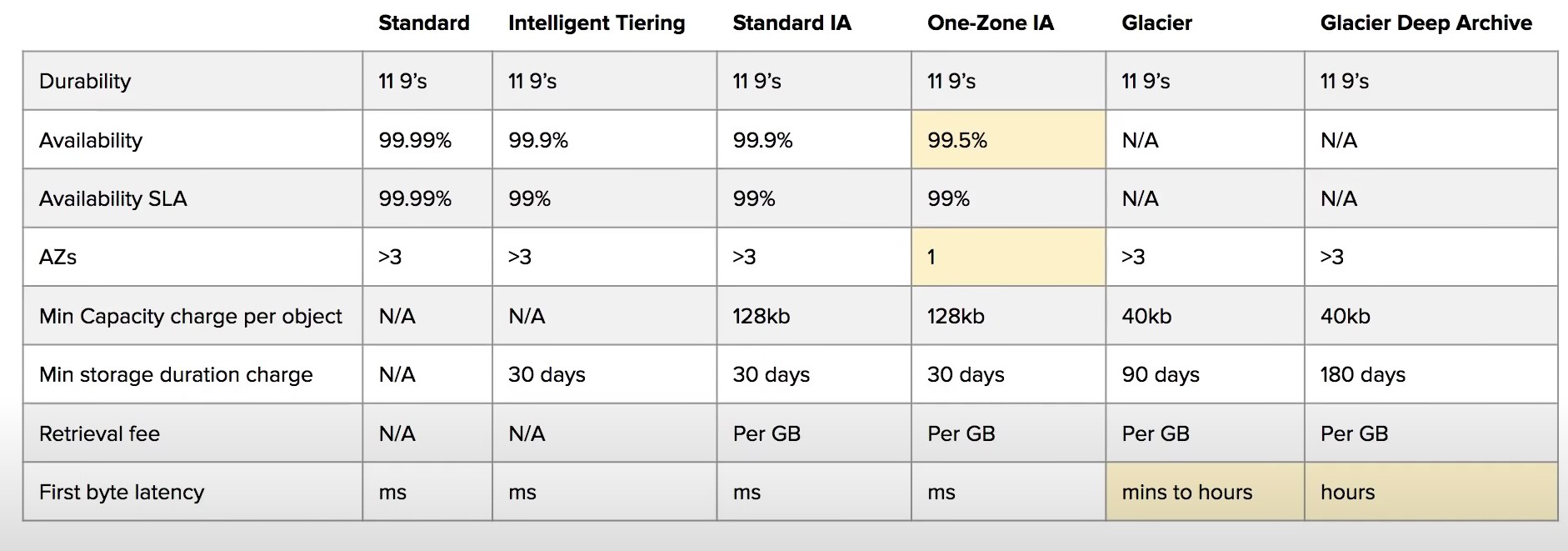
- S3 Guarantees:
- Platform is built for 99.99% availability
- Amazon guarantee 99.99% availability
- Amazon guarantees 11’9s of durability
S3 Security
-
All new buckets are PRIVATE when created by default
-
Logging per request can be turned on a bucket
-
Log files are generated and saved in a different bucket (can be stored in a bucket from different AWS account if desired)
-
Access control is configured using Bucket Policies and Access Control Lists (ACL)
-
User-Based Security
- IAM Policies
- An IAM principal can access an s3 object if the user IAM permissions allow it OR the resource policy allows it and there is no explicit deny
-
Resource-Based Security
-
Bucket Policies - Bucket wide rules from the S3 console
-
JSON based policy
{ "Version": "2012-10-17", "Statement": [{ "Sid": "AllowGetObject", "Principal": { "AWS": "*" }, "Effect": "Allow", "Action": "s3:GetObject", "Resource": "arn:aws:s3:::DOC-EXAMPLE-BUCKET/*", "Condition": { "StringEquals": { "aws:PrincipalOrgID": ["o-aa111bb222"] } } }] } -
You can use the AWS Policy Generator to create JSON policies
-
-
Object ACL - finer grained
-
Bucket ACL - Less common
-
S3 Static Website Hosting
- You must enable public reads on the bucket
S3 Encryption
-
4 types of encryption in S3
-
Server side encryption with managed keys (SSE-S3)
- Key is completely managed by AWS, you never see it
- Object is encrypted server-side
- Enabled by default
- Uses AES-256, must set header
"x-amz-server-side-encryption": "AES256"
- Uses AES-256, must set header
-
Server side encryption with KMS keys stored in AWS KMS (SSE-KMS)
- Manage the key yourself, store the key in KMS
- You can audit the key use in CloudTrail
- Uses AES-256, must set header
"x-amz-server-side-encryption": "AWS:KMS"
- Uses AES-256, must set header
- Accessing the key counts toward your KMS Requests quota (5500, 10000, 30000 rps, based on region)
- You can request a quota increase from AWS
-
Server Side Encryption with customer provided keys (SSE-C)
- Can only be enabled/disabled from the AWS CLI
- AWS doesn’t store the encryption key you provide
- The ky must be passed as part of the headers with every request you make
- HTTPS must be used
-
CSE (Client side encryption)
- Clients encrypt/decrypt all the data before sending any data to S3
- Customer fully managed the keys and encryption lifecycle
-
-
Encryption in Transit
- Traffic between local host and S3 is achieved via SSL/TLS
S3 Objects
S3 Data Consistency
| New Object (PUTS) | Overwrite (PUTS) or Delete Objects (DELETES) |
|---|---|
| Read After Write Consistency | Eventual Consistency |
| When you upload a new S3 Object you are able to read immediately after writing | When you overwrite or delete an object it takes time for S3 to replicate versions to AZs |
| If you were to read immediately, S3 may return you an old copy. You need to generally wait a few seconds before reading |
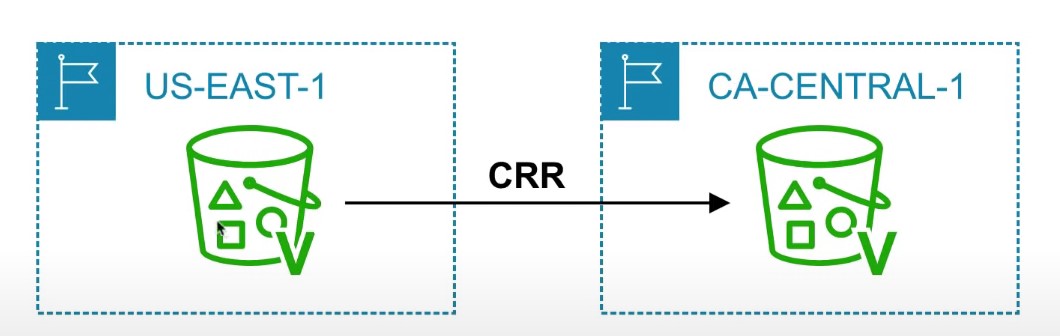
S3 Cross-Region Replication or Same-Region Replication
-
When enabled, any object that is uploaded will be Automatically replicate to another region or from source to destination buckets
-
Must have versioning turned on both the source and destination buckets.
-
Can have CRR replicate to another AWS account
-
Replicate objects within the same region
-
You must give proper IAM permissions to S3
-
Buckets can be in different AWS accounts
-
Only new objects are replicated after enabling replication. To replicate existing objects, you must use S3 Batch Replication
-
For DELETE operations, you can optionally replicate delete markers. Delete Markers are not replicated by default.
-
To replicate, you create a replication rule in the “Management” tab of the S3 bucket. You can choose to replicate all objects in the bucket, or create a rule scope
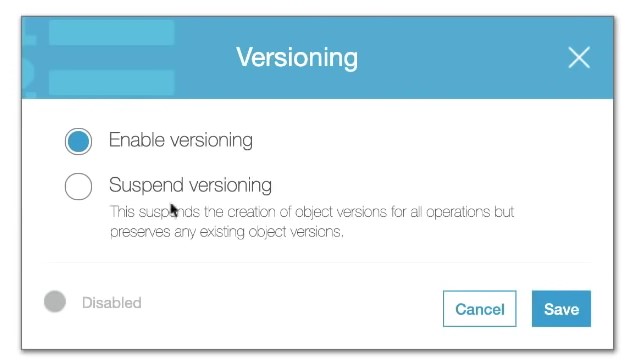
S3 Versioning
-
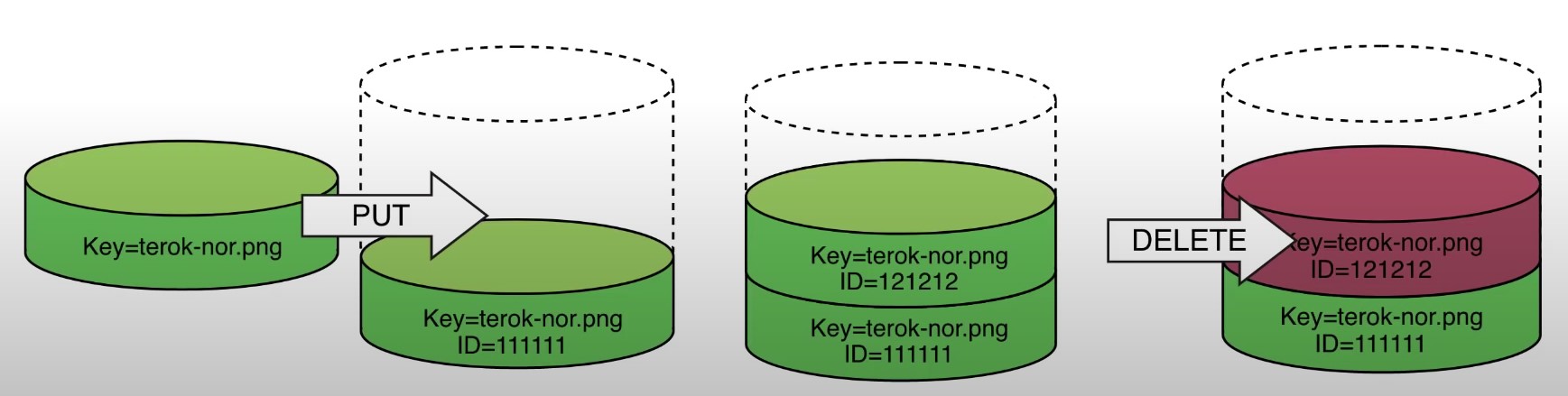
allows to version the object
-
Stores all versions of an object in S3
-
Once enabled it cannot be disabled, only suspended on the bucket
-
Fully integrates with S3 Lifecycle rules
-
MFA Delete feature provides extra protection against deletion of your data
Lifecycle Management
-
Lifecycle Rule Actions
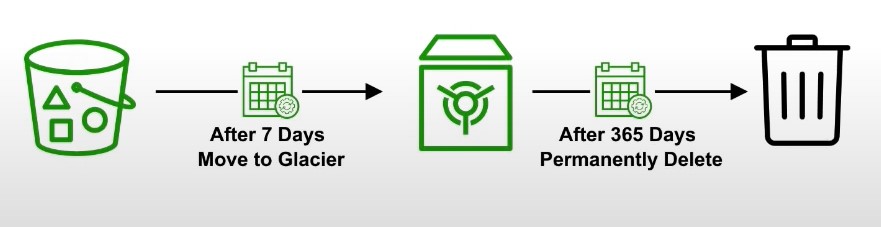
- Move current objects between storage classes
- Move noncurrent versions of objects between storage classes
- Expire current versions of objects
- Permanently delete noncurrent versions of objects
- Delete Expired object delete markers or incomplete multi-part uploads
-
Automates the process of moving objects to different Storage classes or deleting objects all together
-
Can be used together with Versioning
-
Can be applied to both Current and previous versions
S3 Transfer Acceleration
-
Fast and secure transfer of files over long distances between your end users and an S3 bucket
-
Utilizes CloudFront’s distributed Edge locations
-
Instead of uploading to your bucket, users use a distinct URL for an Edge location
-
As data arrives at the Edge location it is automatically routed to S3 over a specially optimized network path. (Amazon’s backbone network)
-
Transfer acceleration is fully compatible with multi-part upload

Presigned URLs
-
Generates a URL which provides temporary access to an object to either upload or download object data.
-
The pre-signed URL inherites the permission of the user that created the pre-signed URL
-
Presigned Urls are commonly used to provide access to private objects
-
Can use AWS CLI or AWS SDK to generate Presigned Urls

-
If in case a web-application which need to allow users to download files from a password protected part of the web-app. Then the web-app generates presigned url which expires after 5 seconds. The user downloads the file.
MFA Delete
-
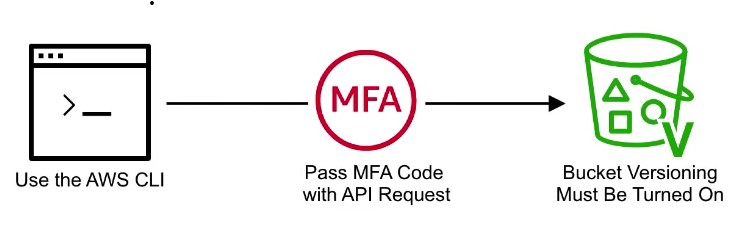
MFA Delete ensures users cannot delete objects from a bucket unless they provide their MFA code.
-
MFA delete can only be enabled under these conditions
- The AWS CLI must be used to turn on MFA
- The bucket must have versioning turned on

-
Only the bucket owner logged in as Root User can DELETE objects from bucket
AWS Snow Family
- AWS Snow Family are Storage and compute devices used to physically move data in or out the cloud when moving data over the internet or private connection it to slow, difficult or costly
- Data Migration: Snowcone, Snowball Edge (Storage Optimized), Snowmobile
- Edge computing: Snowcone, Snowball Edge (Compute Optimized)
- Snowcone
- Small, weighs 4 pounds
- Rugged
- Must provide your own battery and cables
- Snowcone 8TB
- Snowcone 14TB SSD
Storage Services
-
Simple Storage Service (S3)
- A serverless object storage service is created
- can upload very large files and unlimited amount of files
- you pay for what you store
- Need not worry about the underlying file-system or upgrading the disk size
-
S3 Glacier
- Cold storage service
- low cost storage solution for archiving and long-term backup
- Uses previous generation HDD drives to get that low cost
- highly secure and durable
-
Elastic Block Store (EBS)
- a persistent block storage service
- virtual hard drive in the cloud to attach to EC2 instances
- can choose different kinds of storage: SSD, IOPS, SSD, Throughput HHD, Cold HHD
-
Elastic File Storage (EFS)
- a cloud-native NFS file system service
- File storage you can mount to multiple Ec2 instances at the same time
- When you need to share files between multiple EC2 instances
-
Storage Gateway
- a hybrid cloud storage service that extends your on-premise storage to cloud
- File Gateway : extends your local storage to AWS S3
- Volume Gateway : caches your local drives to S3 so you have continuous backup of files on cloud
- Tape Gateway : stores files on virtual tapes for very cost effective and long term storage
- a hybrid cloud storage service that extends your on-premise storage to cloud
-
AWS Snow Family
- Storage devices used to physically migrate large amounts of data
- Snowball and Snowball Edge {Snowball does not exist anymore} briefcase size of data storage devices. 50-80 Terabytes
- Snowmobile Cargo container filled with racks of storage and compute that is transported via semi-trailer tractor truck to transfer upto 100PB of data per trailer
- Snowcone very small version of snowball that can transfer 8TB of data
-
AWS Backup
- a fully managed backup service
- centralize and automate the backup of the backup data across multiple AWS services
- eg. EC2, EBS, RDS, DynamoDB, EFS, Storage Gateway
- can create backup plans
-
Cloud Endure Disaster Recovery
- Continuously replicates your machines into low cost staging area in your target AWS account and preferred region enabling fast and reliable recovery if one of the data center fails
-
Amazon FSx
-
Launch 3rd party high performance file systems on AWS
-
Fully managed service
-
Supports Lustre, OpenZFS, NetApp ONTAP, and Windows File Server (SMB)
-
Data is backed up daily
-
Windows FSx can be mounted on Linux Servers
-
Lustre is derived from Linux and Cluster and used for high-performance computing
-
FSx can be used for on-prem servers using Direct Connect or VPN
-
FSx for Lustre deployment options:
- Scratch file system
- Temporary storage, data is not replicated, high performance
- Persistent File System
- Long term storage, data is replicated within same AZ (files replaced within minutes upon failure)
- Scratch file system
-
FSx for NetApp ONTAP is compatible with NFS, SMB, iSCSI. Supports point-in-time instantaneous cloning
-
Amazon Athena
- A serverless, interactive analytics service built on open-source frameworks, supporting open-table and file formats.
- Athena provides simplified flexible way to analyze petabytes of data where it lives
- Analyze data or build applications from an S3 data lake and 30 data sources, including on-premises data sources or other cloud systems using SQL or Python
Storage Gateway
-
Bridge between on-prem and S3 storage
-
Can run as a virtual or hardware appliance on-prem
-
Use Cases:
- disaster recovery
- backup and restore/cloud migration
- tiered storage
- on-premises cache and low-latency file access
-
S3 File Gateway
- S3 buckets are accessible using the NFS and SMB protocol
- Most recently used data is cached in the file gateway
- Supports S3 standard, S3 Standard IA, S3 One ZOne A, S3 Intelligent Tiering
- Transition to S3 Glacier using a Lifecycle Policy
-
FSx File Gateway
- Native access to Amazon FSx for Windows File Server
- Useful for caching frequently accessed data on your local network
- Windows native compatibility
-
Volume Gateway
- Block storage using iSCSI backed by S3
- Point in time backups
- Gives you the ability to restore on-prem volumes
-
Tape Gateway
- Same as Volume Gateway, but for tapes
Amazon Fsx vs EFS
| EFS | FSx |
|---|---|
| EFS is a managed NAS filer for EC2 instances based on Network File System (NFS) version 4 | FSx is a managed Windows Server that runs Windows Server Message Block (SMB) based files systems |
| File systems are distributed across availability zones (AZs) to eliminate I/O bottlenecks and improve data durability | Built for high performance and sub-millisecond latency using solid-state drive storage volumes |
| Better for Linux Systems | Applications: - Web servers and content management systems built on windows and deeply integrated with windows server ecosystem |
S3 Object Lock
-
With S3 Object Lock, you can store objects using write-once-read-many (WORM) mode.
-
Object lock can prevent from objects from being deleted or overwritten for a fixed amount of time or indefinitely
Governance mode
- Users can’t overwrite or delete an object version or alter its lock settings unless they have special permissions.
- Protect objects against being deleted by most users, but you can still grant some users permission to alter the retention settings or delete the object if necessary.
- Used to test retention-period settings before creating a compliance- mode retention period
Compliance mode
- A protected object version can’t be overwritten or deleted by any user, including the root user
- When an object is locked in compliance mode, its retention mode can’t be changed, and tis retention period can’t be shortened.
- Compliance mode helps ensure that an object version can’t be overwritten or deleted for the duration of the retention period
S3 Event Notifications
- Automatically react to events within S3
- Send events to SNS, SQS, Lambda, or Event Bridge. Event Bridge can then send the notification to many other AWS services
- S3 requires permissions to these resources
- Use case: generate thumbnails of images
S3 Access Point
- Simplify security management for S3 buckets
- Each access point has its own DNS name and access point policy (similar to a bucket policy)
AWS Transfer Family
- Use FTP, FTPS, or sFTP to transfer files to AWS
- Pay per provisioned endpoint per hour + data transfer in GB
- Integrate with existing Authentication system
- Usage: Sharing files, public datasets, etc.
AWS DataSync
- Move large amount of data to and from on-prem or other cloud locations into AWS
- Use NFS, SMB, HDFS, etc. Needs an agent installed.
- Move AWS service to another AWS service, no agent required.
- Replication tasks are scheduled (synced)
- Preserve file permissions and metadata Remember this for the exam!!
- One agent can use up to 10 Gbps. However, you can setup limits.
Storage Comparison
• S3: Object Storage • S3 Glacier: Object Archival • EBS volumes: Network storage for one EC2 instance at a time • Instance Storage: Physical storage for your EC2 instance (high IOPS) • EFS: Network File System for Linux instances, POSIX filesystem • FSx for Windows: Network File System for Windows servers • FSx for Lustre: High Performance Computing Linux file system • FSx for NetApp ONTAP: High OS Compatibility • FSx for OpenZFS: Managed ZFS file system • Storage Gateway: S3 & FSx File Gateway, Volume Gateway (cache & stored), Tape Gateway • Transfer Family: FTP, FTPS, SFTP interface on top of Amazon $3 or Amazon EFS • DataSync: Schedule data sync from on-premises to AWS, or AWS to AWS • Snowcone / Snowball / Snowmobile: to move large amount of data to the cloud, physically • Database: for specific workloads, usually with indexing and querying