Azure Firewall
Introduction
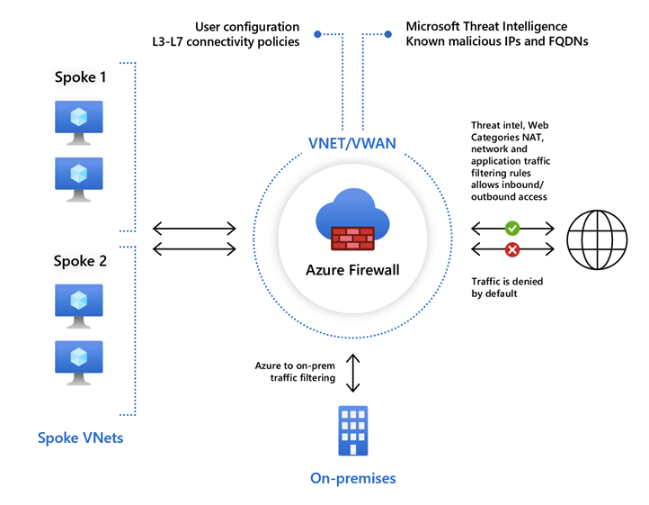
- Azure Firewall is a managed, cloud-based network security service that protects your Azure Virtual Network resources. It’s a fully stateful firewall as a service with built-in high availability and unrestricted cloud scalability. It can be used to scan inbound and outbound traffic.
- Azure Firewall requires it’s own subnet. The name needs to be
AzureFirewallSubnet. - Force Tunneling requires that a subnet named
AzureFirewallManagementSubnetbe created. This subnet is used for Azure Firewall management traffic.
Azure Firewall Features
- Built-in high availability
- Unrestricted cloud scalability
- Application FQDN Filtering rules
- FQDN Tags - tags make it easy for you to allow well-known Azure Service network traffic through your firewall.
- Service Tags - A service tag represents a group of IP address prefixes to help minimize security rule complexity. Microsoft manages these. You cannot create your own service tags or modify existing service tags.
- Threat Intelligence - IDS/IPS
- TLS Inspection - decrypt outbound traffic, process the data, and then re-encrypt it before sending it to it’s destination
- Outbound SNAT support
- Inbound DNAT support
- Forced Tunneling
Rule Processing
Classic Rules
- You can create NAT rules, network rules, and application rules, and this can all be done using classic rules or Firewall Policy
- Azure Firewall denies all traffic by default. You must create rules to allow traffic.
- With classic rules, rule collections are processed according to the rule type in priority order. Lower to higher numbers from 100 (highest priority) to 65000 (lowest priority).
Firewall Policy
- Configuring a single Azure Firewall can be complex due to multiple rule collections, including:
- Network Address Translation (NAT) rules
- Network rules
- Application rules
- Additional complexities include custom DNS settings, threat intelligence rules, and the need for different rules for different groups (e.g., developers, database users, marketing).
- Firewall Policy:
- An Azure resource that contains collections of NAT, network, and application rules.
- Also includes custom DNS settings, threat intelligence settings, and more.
- Can be applied to multiple firewalls via Azure Firewall Manager.
- Supports hierarchical policies, where a base policy can be inherited by specialized policies.
- With Firewall Policy, rules are organized in rule collections which are contained in rule collection groups. Rule collections can be of the following types:
- DNAT
- Network
- Application
- You can define multiple rule collection types in a rule collection group. But all of the rules in a rule collection must be of the same type.
- Rule collections are processed in the following order:
- DNAT
- Network
- Application
Availability Zones
- Azure Firewall supports Availability Zones. When you create an Azure Firewall, you can choose to deploy it in a single zone or across all zones.
- SLAs:
- Single Zone: 99.95%
- Multiple Zones: 99.99%
Azure Firewall Service Tiers
- Azure Firewall is available in three service tiers: Basic, Standard, and Premium.
- Basic: Designed for small and medium-sized businesses.
- Provides basic network traffic protection at an affordable cost.
- Standard: Designed for organizations that require basic network security with high scalability at a moderate price.
- Premium: Designed for organizations in highly regulated industries that handle sensitive information and require a higher level of network security.
- Able to encrypt/decrypt network traffic for TLS inspection
- IDS/IPS capabilities
- Supports path based URL filtering
- Standard supports URL filtering, but you cannot filter based on the path of the URL.
- Web Categories
- Allow or deny traffic to and from websites based on categories (gambling, social media, pornography, etc.)
- Basic: Designed for small and medium-sized businesses.
Azure Firewall Capabilities
- Network Filtering
- Can filter traffic based on the five tuples of the source IP address, destination IP address, source port, destination port, and protocol.
- You can filter based on user-defined groups of IP addresses of Azure Service Tags.
- Can filter traffic based on the five tuples of the source IP address, destination IP address, source port, destination port, and protocol.
- FQDN Filtering
- A simple URL filter without TLS termination or packet inspection.
- FQDN Filtering can be enabled at the network level or the application level. If configured at the application layer, it uses information in the HTTP headers to allow or block outgoing web traffic or Azure SQL traffic.
- Can be bypassed by initiating requests using IP addresses.
- To simplify applying rules to multiple FQDNs, you can use FQDN Tags. For example, if you wanted to filter Windows Update FQDNs, rather than manually maintaining a list of all the Windows Update FQDNs, you could simply use the Windows Update FQDN Tag.
- URL Filtering
- Expands on FQDN filtering to evaluate the entire URL path, rather than just domain names.
- This feature is only available with the Premium SKU.
- Web Categorization Filtering
- Can be used to allow or block outgoing web traffic based on the category of the website. For example, you could block all social media websites.
- Both Standard and Premium SKUs support this feature, with the Premium SKU supporting more accurate categorization.
- Threat Intelligence-based Filtering
- Azure Firewall can use threat intelligence feeds to block known malicious IP addresses and domains.
- Enabled in Alert Mode by default. But can be configured in Alert and Deny mode or even Disabled.
- Supported by both Premium and Standard SKUs.
Azure Firewall Manager
- Azure Firewall Manager provides a central point for configuration and management of multiple Azure Firewall instances.
- Enables the creation of one or more firewall policies that can be rapidly applied to multiple firewalls.
Key Features of Azure Firewall Manager
| Feature | Description |
|---|---|
| Centralized management | Manage all firewall configurations across your network. |
| Manage multiple firewalls | Deploy, configure, and monitor multiple firewalls from a single interface. |
| Supports multiple network architectures | Protects standard Azure virtual networks and Azure Virtual WAN Hubs. |
| Automated traffic routing | Network traffic is automatically routed to the firewall (when used with Azure Virtual WAN Hub). |
| Hierarchical policies | Create parent and child firewall policies; child policies inherit rules/settings from parent. |
| Support for third-party security providers | Integrate third-party SECaaS solutions to protect your network’s internet connection. |
| DDoS protection plan | Associate virtual networks with a DDoS protection plan within Azure Firewall Manager. |
| Manage Web Application Firewall policies | Centrally create and associate Web Application Firewall (WAF) policies for platforms like Azure Front Door and Azure Application Gateway. |
Note: Azure Firewall Manager allows integration with third-party SECaaS solutions, enabling Azure Firewall to monitor local traffic while the third-party provider monitors internet traffic.
Architecture Options
- Hub virtual network: A standard Azure virtual network where one or more firewall policies are applied.
- Secured virtual hub: An Azure Virtual WAN Hub where one or more firewall policies are applied.