Kinesis
Introduction
- Kinesis is a set of services provided by AWS
- Kinesis Data Streams: capture, process, and store data streams
- Kinesis Data Firehose: load data streams into AWS data stores
- Kinesis Data Analytics: analyze data streams with SQL or Apache Flink
- Kinesis Video Streams: Capture, process and store video streams
Kinesis Data Firehose
- Records up to 1 MB can be sent to Kinesis Data Firehose and Firehose will then batch writees to other resources in near real-time
- Fully managed by AWS, autoscales
- Pay only for the data going through Firehose
- Producers such as (Applications, Kinesis Agent, Kinesis Data Streams, CloudWatch, AWS IoT) can write to Firehose, and Firehose will then send the data to S3, RedShift, or OpenSearch
- Data Firehose can also send to 3rd parties such as Splunk, Datadog, etc.
- You can transform data using Lambda functions before sending it to the destination
Kinesis Streams
Collect and process large streams of data in real-time.
Use Cases:
- Fast (second/millisecond latency) processing of log events
- Real-time metrics and reporting
- Data analytics
- Complex stream processing
Kinesis Libraries / Tools:
Producing Data:
-
Kinesis Producer Library (KPL)
- Blog post: Implementing Efficient and Reliable Producers with the Amazon Kinesis Producer Library
- Auto-retry configurable mechanism
- Supports two complementary ways of batching:
- Collection (of stream records):
- Buffers/collects records to write multiple records to multiple shards in a single request.
RecordMaxBufferedTime: max time a record may be buffered before a request is sent. Larger = more throughput but higher latency.
- Aggregation (of user records):
- Combines multiple user records into a single Kinesis stream record (using PutRecords API request).
- KCL integration (for deaggregating user records).
- Collection (of stream records):
-
Kinesis Agent
- Standalone application that you can install on the servers you’re interested in.
- Features:
- Monitors file patterns and sends new data records to delivery streams
- Handles file rotation, checkpointing, and retry upon failure
- Delivers all data in a reliable, timely, and simpler manner
- Emits CloudWatch metrics for monitoring and troubleshooting
- Allows preprocessing data, e.g., converting multi-line record to single line, converting from delimiter to JSON, converting from log to JSON.
Kinesis Streams API:
Reading Data:
- Kinesis Client Library (KCL)
- The KCL ensures there is a record processor running and processing each shard.
- Uses a DynamoDB table to store control data. It creates one table per application that is processing data.
- Creates a worker thread for each shard. Auto-assigns shards to workers (even workers on different EC2 instances).
- KCL Checkpointing
- Last processed record sequence number is stored in DynamoDB.
- On worker failure, KCL restarts from last checkpointed record.
- Supports deaggregation of records aggregated with KPL.
- Note: KCL may be bottlenecked by DynamoDB table (throwing Provisioned Throughput Exceptions). Add more provisioned throughput to the DynamoDB table if needed.
Emitting Data:
- Kinesis Connector Library (Java) for KCL
- Connectors for: DynamoDB, Redshift, S3, Elasticsearch.
- Java library with the following steps/interfaces:
iTransformer: maps from stream records to user-defined data model.iFilter: removes irrelevant records.iBuffer: buffers based on size limit and total byte count.iEmitter: sends the data in the buffer to AWS services.S3Emitter: writes buffer to a single file.
Kinesis Stream API:
- PutRecord (single record per HTTP request)
- PutRecords (multiple records per single HTTP request). Recommended for higher throughput.
- Single record failure does not stop the processing of subsequent records.
- Will return HTTP 200 as long as some records succeed (even when others failed).
- Retry requires application code in the producer to examine the
PutRecordsResultobject and retry whichever records failed.
Key Concepts
Kinesis Data Streams:
-
Stream big data into AWS
-
A stream is a set of shards. Each shard is a sequence of data records.
- Shards are numbered (shard1, shard2, etc.)
-
Each data record has a sequence number that is assigned automatically by the stream.
-
A data record has 3 parts:
- Sequence number
- Partition key
- Data blob (immutable sequence of bytes, up to 1000KB).
-
Sequence number is only unique within its shard.
-
Retention Period:
- Retention for messages within a Data Stream can be set to 1 - 365 days
- You pay more for longer retention periods.
-
Consumers and Producers
- producers send data (records) into data streams
- records consist of a partition key and a data blob
- producers can send 1MB/sec or 1000 msg/sec per shard
- Consumers receive data from data streams
- consumers can be apps, lambda functions, Kinesis Data Firehose, or Kinesis Data Analytics
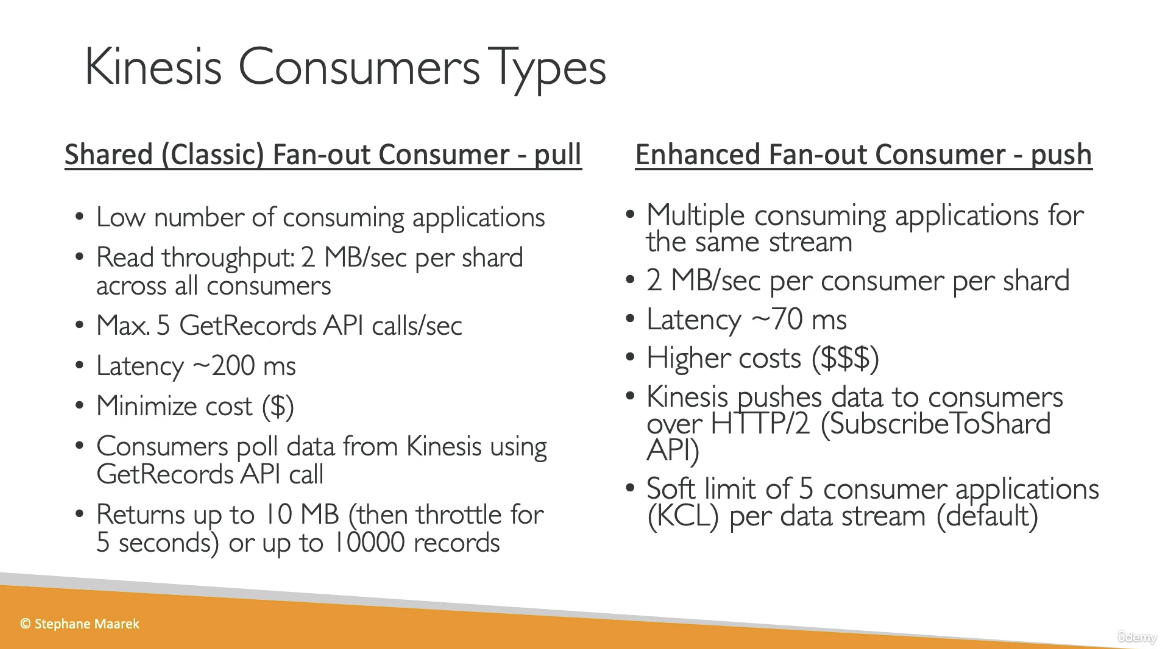
- Consumers can receive messages at 2 MB/sec (shared version, across all consumers) per shard or 2 MB/sec (enhanced version) per consumer per shard
- producers send data (records) into data streams
-
Once data is inserted into Kinesis, it cannot be deleted
-
Capacity Modes:
- Provisioned Mode
- Choose the number of shards provisioner
- Scale manually
- Each shard gets 1 MB/s in and 2 MB/s out
- Pay per shard provisioned per hour
- On-demand Mode:
- No need to provision or manage capacity
- Auto-scaling
- Pay per stream per hour and data in/out per GB
- Provisioned Mode
-
Access control to Data Streams using IAM policies
-
Encryption in flight with HTTPS and at rest with KMS
-
Kinesis Data Streams support VPC Endpoints
-
Monitor API calls using CloudTrail
Kinesis Application Name:
- Each application must have a unique name per (AWS account, region). The name is used to identify the DynamoDB and the namespace for CloudWatch metrics.
Partition Keys:
- Used to group data by shard within a stream. It must be present when writing to the stream.
- When writing to a stream, Kinesis separates data records into multiple shards based on each record’s partition key.
- Partition keys are Unicode strings with a maximum length of 256 bytes. An MD5 hash function is used to map partition keys to 128-bit integer values that define which shard records will end up in.
Kinesis Shard:
- Uniquely identified group of data records in a stream.
- Multiple shards in a stream are possible.
- Single shard capacity:
- Write: 1 MB/sec input, 1000 writes/sec.
- Read: 2 MB/sec output, 5 transaction reads/sec.
- Resharding:
- Shard split: divide a shard into two shards.
- Example using boto3:
sinfo = kinesis.describe_stream("BotoDemo")
hkey = int(sinfo["StreamDescription"]["Shards"][0]["HashKeyRange"]["EndingHashKey"])
shard_id = 'shardId-000000000000'  # we only have one shard!
kinesis.split_shard("BotoDemo", shard_id, str((hkey+0)/2))
- Example using boto3:
- Shard merge: merge two shards into one.
- Shard split: divide a shard into two shards.
Kinesis Server-Side Encryption:
- Can automatically encrypt data written, using KMS master keys. Both producer and consumer must have permission to access the master key.
- Add
kms:GenerateDataKeyto producer’s role. - Add
kms:Decryptto consumer’s role.
Kinesis Firehose:
- Managed service for loading data from streams directly into S3, Redshift, and Elasticsearch.
- Fully managed: scalability, sharding, and monitoring with zero admin.
- Secure.
- Methods to Load Data:
- Use Kinesis Agent.
- Use AWS SDK.
- PutRecord and PutRecordBatch.
- Firehose to S3:
- Buffering of data before sending to S3. Sends whenever any of these conditions is met:
- Buffer size (from 1 MB to 128 MB).
- Buffer interval (from 60s to 900s).
- Can invoke AWS Lambda for data transformation.
- Data flow:
- Buffers incoming data up to 3 MB or buffering size specified, whichever is lowest.
- Firehose invokes Lambda function.
- Transformed data is sent from Lambda to Firehose for buffering.
- Transformed data is delivered to the destination.
- Response from Lambda must include:
recordId: must be the same as prior to transformation.result: status, one of: “Ok”, “Dropped”, “ProcessingFailed”.data: Transformed data payload.
- Failure handling of data transformation:
- 3 retries.
- Invocation errors logged in CloudWatch Logs.
- Unsuccessful records are stored in
processing_failedfolder in S3. - It’s possible to store the source records in S3, prior to transformation (Backup S3 bucket).
- Data flow:
- Buffering of data before sending to S3. Sends whenever any of these conditions is met:
- Data Delivery Speed:
- S3: based on buffer size/buffer interval.
- Redshift: depending on how fast the Redshift cluster finishes the COPY command.
- Elasticsearch: depends on buffer size (1-100 MB) and buffer interval.
- Firehose Failure Handling:
- S3: retries for up to 24 hrs.
- Redshift: retry duration from 0-7200 sec (2 hrs) from S3.
- Skips S3 objects on failure.
- Writes failed objects in manifest file, which can be used manually to recover lost data (manual backfill).
- ElasticSearch: retry duration 0-7200 sec.
- On failure, skips index request and stores in
index_failedfolder in S3. - Manual backfill.
- On failure, skips index request and stores in
AWS Kinesis Overview:
- Enables real-time processing of streaming data at massive scale.
- Kinesis Streams:
- Enables building custom applications that process or analyze streaming data for specialized needs.
- Handles provisioning, deployment, ongoing-maintenance of hardware, software, or other services for the data streams.
- Manages the infrastructure, storage, networking, and configuration needed to stream the data at the required data throughput level.
- Synchronously replicates data across three facilities in an AWS Region, providing high availability and data durability.
- Stores records of a stream for up to 24 hours, by default, from the time they are added to the stream. The limit can be raised to up to 7 days by enabling extended data retention.
- Data such as clickstreams, application logs, social media, etc., can be added from multiple sources and within seconds is available for processing to the Amazon Kinesis Applications.
- Provides ordering of records, as well as the ability to read and/or replay records in the same order to multiple Kinesis applications.
- Useful for rapidly moving data off data producers and then continuously processing the data, whether it is to transform the data before emitting to a data store, run real-time metrics and analytics, or derive more complex data streams for further processing.
Use Cases:
- Accelerated log and data feed intake: Data producers can push data to Kinesis stream as soon as it is produced, preventing any data loss and making it available for processing within seconds.
- Real-time metrics and reporting: Metrics can be extracted and used to generate reports from data in real-time.
- Real-time data analytics: Run real-time streaming data analytics.
- Complex stream processing: Create Directed Acyclic Graphs (DAGs) of Kinesis Applications and data streams, with Kinesis applications adding to another Amazon Kinesis stream for further processing, enabling successive stages of stream processing.
Kinesis Limits:
- Stores records of a stream for up to 24 hours, by default, which can be extended to max 7 days.
- Maximum size of a data blob (the data payload before Base64-encoding) within one record is 1 megabyte (MB).
- Each shard can support up to 1000 PUT records per second.
- Each account can provision 10 shards per region, which can be increased further through request.
- Amazon Kinesis is designed to process streaming big data and the pricing model allows heavy PUTs rate.
- Amazon S3 is a cost-effective way to store your data but not designed to handle a stream of data in real-time.
Kinesis Streams Components:
Shard:
- Streams are made of shards and is the base throughput unit of a Kinesis stream.
- Each shard provides a capacity of 1MB/sec data input and 2MB/sec data output.
- Each shard can support up to 1000 PUT records per second.
- All data is stored for 24 hours.
- Replay data inside a 24-hour window.
- Capacity Limits: If the limits are exceeded, either by data throughput or the number of PUT records, the put data call will be rejected with a
ProvisionedThroughputExceededexception.- This can be handled by:
- Implementing a retry on the data producer side, if this is due to a temporary rise of the stream’s input data rate.
- Dynamically scaling the number of shared (resharding) to provide enough capacity for the put data calls to consistently succeed.
- This can be handled by:
Record:
- A record is the unit of data stored in an Amazon Kinesis stream.
- A record is composed of a sequence number, partition key, and data blob.
- Data blob is the data of interest your data producer adds to a stream.
- Maximum size of a data blob (the data payload before Base64-encoding) is 1 MB.
Partition Key:
- Used to segregate and route records to different shards of a stream.
- Specified by your data producer while adding data to an Amazon Kinesis stream.
Sequence Number:
- A unique identifier for each record.
- Assigned by Amazon Kinesis when a data producer calls
PutRecordorPutRecordsoperation to add data to an Amazon Kinesis stream. - Sequence numbers for the same partition key generally increase over time; the longer the time period between
PutRecordorPutRecordsrequests, the larger the sequence numbers become.
Data Producers:
- Data can be added to an Amazon Kinesis stream via
PutRecordandPutRecordsoperations, Kinesis Producer Library (KPL), or Kinesis Agent.
Amazon Kinesis Agent:
- A pre-built Java application that offers an easy way to collect and send data to Amazon Kinesis stream.
- Can be installed on Linux-based server environments such as web servers, log servers, and database servers.
- Configured to monitor certain files on the disk and then continuously send new data to the Amazon Kinesis stream.
Amazon Kinesis Producer Library (KPL):
- An easy to use and highly configurable library that helps you put data into an Amazon Kinesis stream.
- Presents a simple, asynchronous, and reliable interface that enables you to quickly achieve high producer throughput with minimal client resources.
Amazon Kinesis Application:
- A data consumer that reads and processes data from an Amazon Kinesis stream.
- Can be built using either Amazon Kinesis API or Amazon Kinesis Client Library (KCL).
Amazon Kinesis Client Library (KCL):
- A pre-built library with multiple language support.
- Delivers all records for a given partition key to the same record processor.
- Makes it easier to build multiple applications reading from the same Kinesis stream (e.g., to perform counting, aggregation, and filtering).
- Handles complex issues such as adapting to changes in stream volume, load-balancing streaming data, coordinating distributed services, and processing data with fault-tolerance.
Amazon Kinesis Connector Library:
- A pre-built library that helps you easily integrate Amazon Kinesis Streams with other AWS services and third-party tools.
- Kinesis Client Library is required for Kinesis Connector Library.
Amazon Kinesis Storm Spout:
- A pre-built library that helps you easily integrate Amazon Kinesis Streams with Apache Storm.
Kinesis vs SQS:
- Kinesis Streams enables real-time processing of streaming big data while SQS offers a reliable, highly scalable hosted queue for storing messages and moving data between distributed application components.
- Kinesis provides ordering of records, as well as the ability to read and/or replay records in the same order to multiple Amazon Kinesis Applications, while SQS does not guarantee data ordering and provides at least once delivery of messages.
- Kinesis stores the data up to 24 hours, by default, and can be extended to 7 days, while SQS stores the message up to 4 days, by default, and can be configured from 1 minute to 14 days but clears the message once deleted by the consumer.
- Kinesis and SQS both guarantee at-least-once delivery of messages.
- Kinesis supports multiple consumers, while SQS allows the messages to be delivered to only one consumer at a time and requires multiple queues to deliver messages to multiple consumers.
Kinesis Use Case Requirements:
- Ordering of records.
- Ability to consume records in the same order a few hours later.
- Ability for multiple applications to consume the same stream concurrently.
- Routing related records to the same record processor (as in streaming MapReduce).
SQS Use Case Requirements:
- Messaging semantics like message-level ack/fail and visibility timeout.
- Leveraging SQS’s ability to scale transparently.
- Dynamically increasing concurrency/throughput at read time.
- Individual message delay, which can be delayed.