🏠 Back to Blog
When you deploy an application, it will communicate in one of two ways
Synchronous: Applications talk directly to each other
Asynchronous: Applications use some type of ‘middle-man’ to communicate, such as a queue
A queue can have multiple producers and multiple consumers
SQS offers unlimited throughput and unlimited messages, with less than 10 ms latency
SQS is the oldest service provided by AWS
The default TTL of a message in the queue is 4 days and the maximum is 14 days
Messages must be less than 256 KB
SQS can have duplicate messages and messages may be delivered out of order
Messages are sent to SQS using the SendMessage API
The message is persisted until a consumer deletes it, unless the TTL expires
An application you write. Can be hosted anywhere (AWS, on-prem, etc.)
The consumer will poll the queue for new messages and receive up to 10 messages at a time
Consumers need to delete messages after processing them, otherwise other consumers may receive the messages
You can create a EC2 ASG to pull the CloudWatch Metric “Queue Length” and scale in/out based on the value of the metric
This metric value is the number of messages in a queue
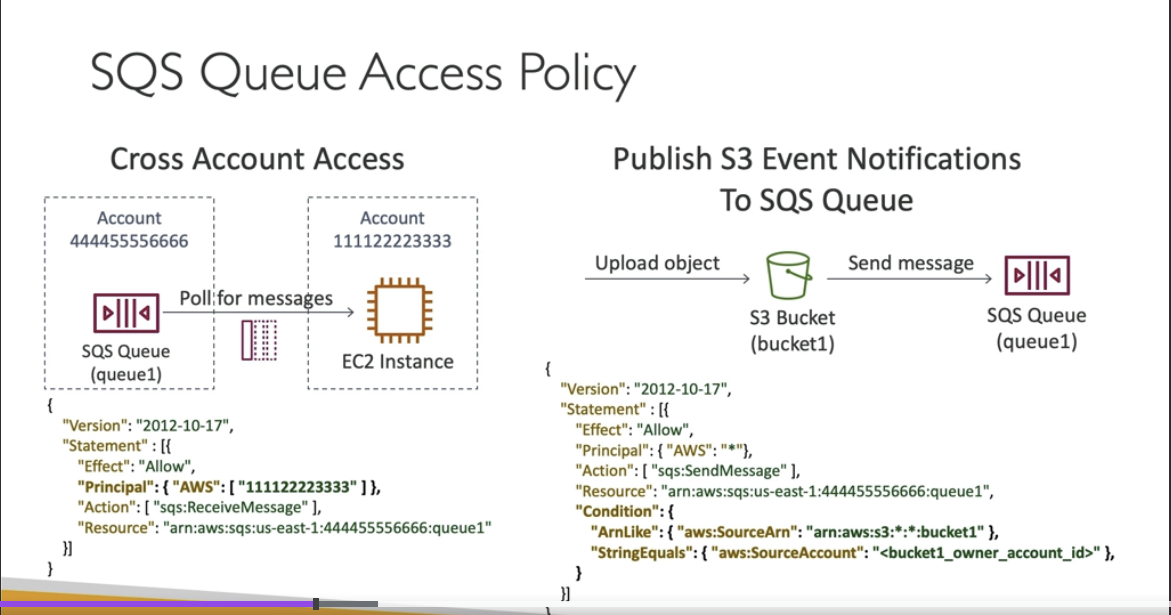
You can allow an EC2 instance in a different AWS account to access a queue using an SQS access policy
You can use an access policy to allow an S3 bucket to write to an SQS queue using Event Notifications
After a message is polled by a consumer, it becomes invisible to other consumers
By default, the message is invisible to other consumers for 30 seconds
If a message is not processed within the visibility timeout, it may be processed twice. Your application can change this behavior by calling the ChangeMessageVisibility API
If a consumer fails to process a message within the Visibility Timeout, the message goes back to the queue.
We can set a threshold of how many times the message can go back into the queue
After the MaximumRecieves threshold is exceeded, the message goes into a dead letter queue (DLQ)
The Dead letter queue of a FIFO queue must also be a FIFO queue
The dead letter queue of a standard queue must also be a standard queue
First in, first out
Messages are ordered in the queue, first message to arrive is the first message to leave
The name of the queue must end in ‘.fifo’
De-duplication
default de-duplication interval is 5 minutes
Two de-duplication methods:
Content based de-duplication: will hash the message body and compare
Explicitly provide a Message De-duplication Id
Message Grouping